All bookings must be made through our EnrolMy system before payment is sent.
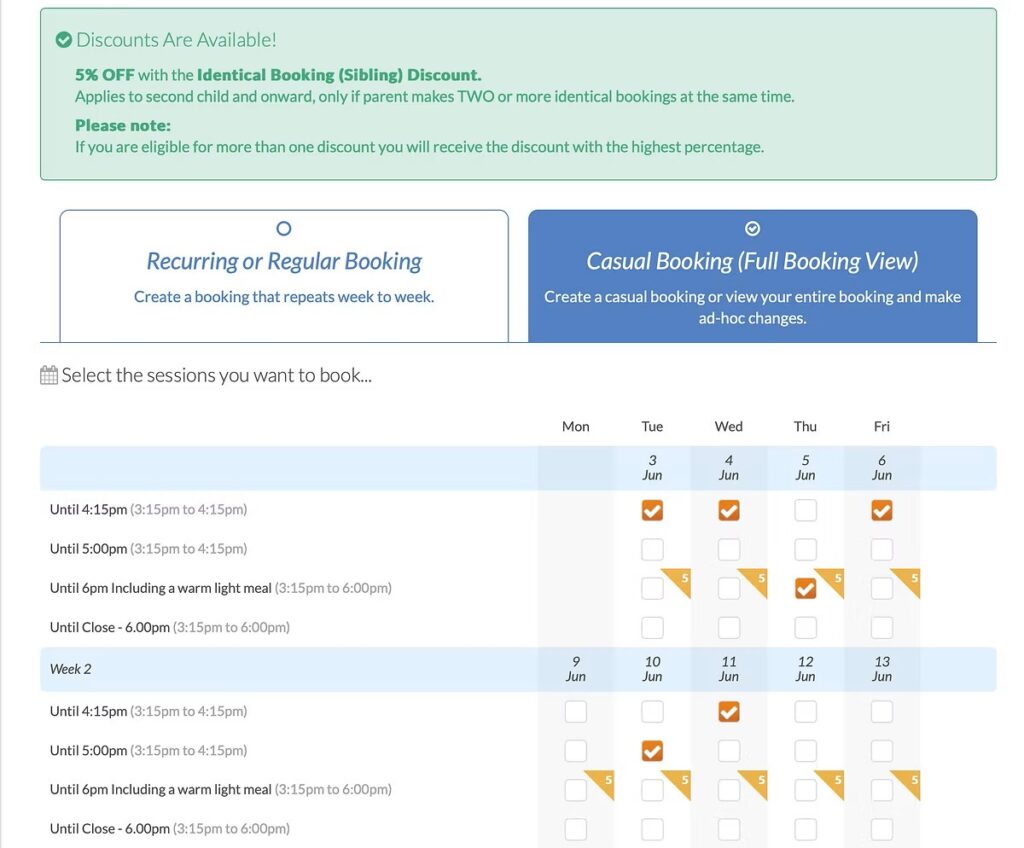
Select your activity, choose your dates, and complete your child’s details.
Once you reach the payment page, you’ll be able to apply the childcare voucher option.
Pay Through Your Childcare Provider
Once your booking is complete, log into your childcare voucher provider and make payment to: You dont want to lose your spot by not making payment.
This is the most important step ✅
When making your payment, you must use the correct childcare voucher reference code for your setting:
George Grenville Academy – 2666030
Twyford Church of England Primary School – 2666033
👉 This allows us to correctly match your payment to your booking.
If your provider doesn’t allow you to add a reference, please email us with:
Your child’s name
The amount paid
The date of payment
We’ll make sure everything is matched correctly.
Casual Booking: Pick and choose the specific dates you want — and yes, you can book multiple all in one go with just a few clicks.
Recurring / Regular Booking: Book the same day each week for the whole school year (e.g., every Monday).
If you’re using childcare vouchers or grants, select the relevant option. If not, just leave this blank. Choose Your Payment Option
Decide whether you’d like to pay in full or set up an instalment plan.
This important form will collect:
Your child’s details (name, DOB, school)
Parent/guardian contact info
Emergency contacts
Collection permissions (who can and cannot collect your child)
Health conditions, allergies, or behavioral notes
Consent for promotional materials (photos/videos)